Article Overview
The following article describes EasySend’s platform Single Sign On (SSO) capabilities. It describes what SSO is, what are:
- Security Assertion Markup Language (SAML)
- OpenID Connect (OIDC)
How SSO and SAML work, and how to configure them.
What is SSO?
(See Figure 1)
SSO is a method of authentication that allows users to log in to several applications with the same credentials. SSO replaces the need to manage separate usernames and passwords for each application individually. For example, when users click "Sign in with Google", they can log in to non-Google applications using their Google account.
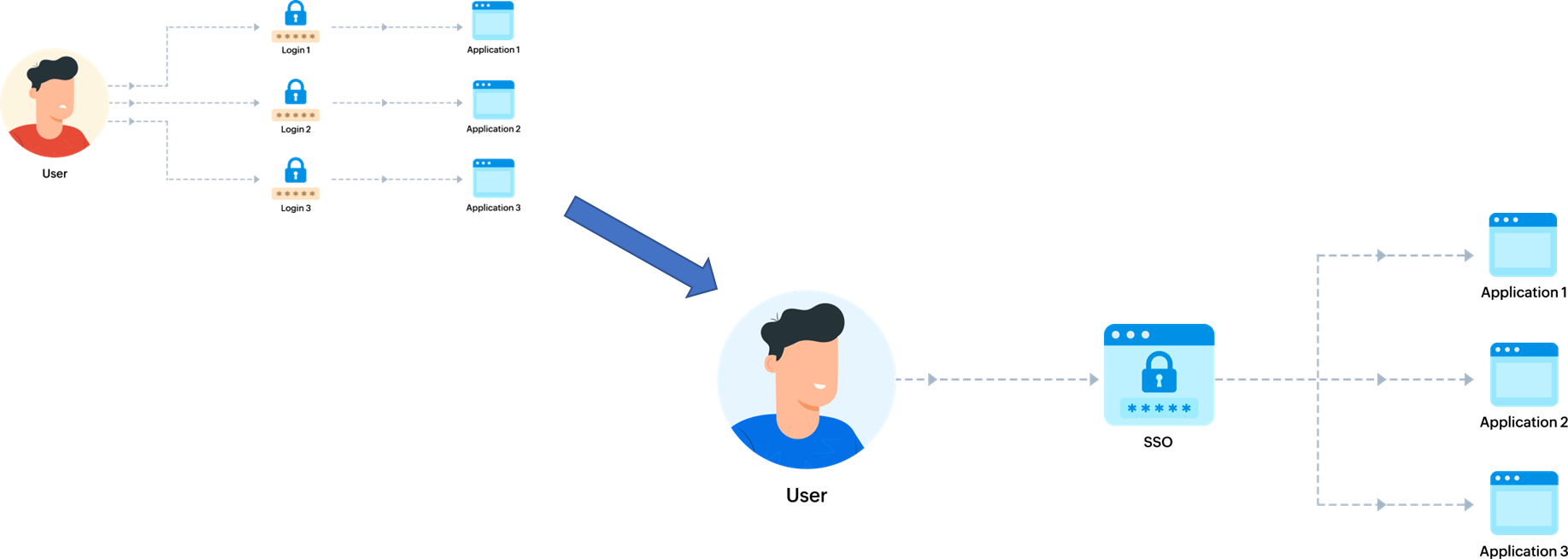
Figure 1: SSO Logic
SSO Protocols
SSO protocols are a set of rules and standards that define how authentication and authorization are performed between different applications. There are several SSO protocols available; EasySend supports three of the most commonly used. The following sections describe them.
SAML
SAML is an XML-based standard that enables the secure exchange of authentication and authorization information between different applications. It provides a framework for identity federation, allowing users to access multiple applications or services using a single set of credentials.
SAML operates based on a trust relationship between two entities: the Identity Provider (IdP) and the Service Provider (SP). The IdP is responsible for authenticating the user and generating SAML assertions, which are XML-based security tokens containing information about the user’s identity and authentication status. The SP relies on these assertions to grant or deny access to its resources.
OIDC
OIDC is an authentication protocol that builds upon the OAuth 2.0 framework to provide a secure and reliable method for authenticating users across different applications. It adds an identity layer to OAuth 2.0, allowing applications to obtain user identity information in a standardized and interoperable manner.
OIDC uses JSON Web Tokens (JWTs) as a means of exchanging information between the IdP and the SP. JWTs are digitally signed and encrypted tokens that contain claims about the user’s identity. These claims can include information such as the user’s unique identifier, name, email address, and other relevant attributes.
Google OAuth 2.0
OAuth 2.0 is an authorization framework that enables users to grant access to their protected resources to third-party applications without sharing their credentials. It provides a secure and standardized method for delegated authorization, allowing users to control which resources they want to share and for how long.
SSO Protocols Comparison
Figure 2 compares the three SSO protocols.
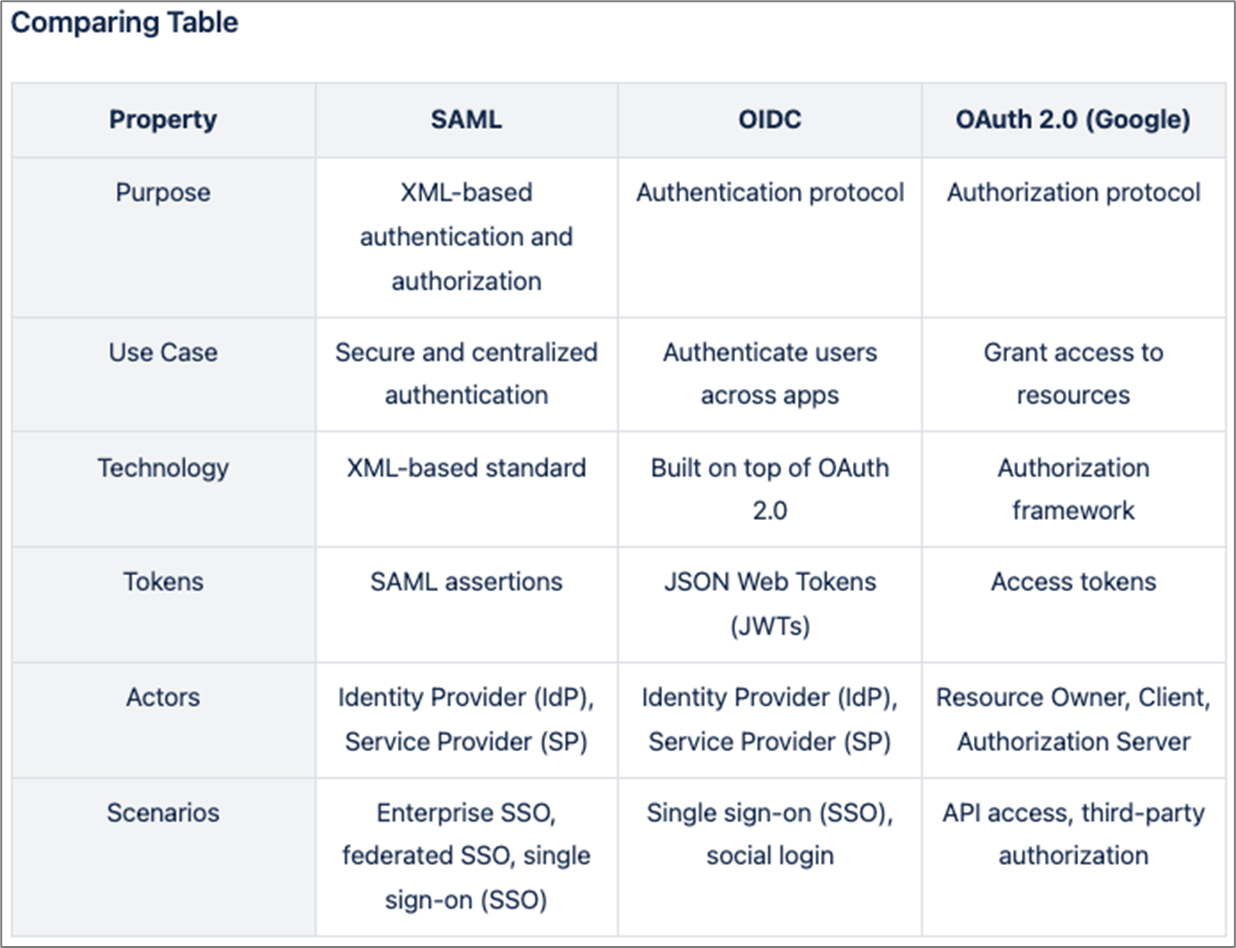
Figure 2: SSO Logic
SSO in EasySend
EasySend's platform is separated into two main products:
- Builder - The editor platform where the processes and all the other services are configured
- Player - The server that runs all the processes created in the Builder
Both of them support SSO but act as two different environments that demand dedicated SSO applications for each.
In the Builder, all the SSOs are configured on the dedicated Builder environment, while in the Player, EasySend provides a separate environment (single-tenant) for each customer and a dedicated User Pool on AWS Cognito.
SSO Configuration in EasySend - Builder
The following section describes different SSO configurations done in the Builder.
Attributes/Claims Mapping
In all of the protocols, EasySend has to get the following record attributes to create a user:
- Email Address
- First Name
- Last Name
- Group ID
SAML
- Single sign-on URL / Reply URL - https://login.easysend.io/saml2/idpresponse
- Audience URI / Identifier (Entity ID) - urn:amazon:cognito:sp:us-east-2_GvaJHpqWv
- Info EasySend expects to get back:
- Metadata document source - one of the two options:
- Metadata document file
- Metadata document endpoint URL
- Metadata document source - one of the two options:
OIDC
- Sign-in redirect URIs - https://login.easysend.io/oauth2/idpresponse
- Sign-out redirect URIs - https://login.easysend.io
- Info EasySend expects to get back:
- Client ID
- Client Secret
- Attribute request method: GET/POST
- Retrieve OIDC endpoints - one of the fallowing options:
- Auto-fill through issuer URL:
- Issuer URL
- Manual input:
- Issuer URL
- Authorization endpoint
- Token endpoint
- UserInfo endpoint
- Jwks_uri endpoint
- Auto-fill through issuer URL:
Google OAuto 2.0
In the Builder, EasySend configured the Google OAuto 2.0 out of the box, and if you wish to create a user with Google SSO, contact your EasySend representative.
SSO Configuration in EasySend - Player
The following section describes different SSO configurations done in the Player.
Attribute Mapping (Optional)
While the Builder has tough requirements for the attributes, in the Player, you can choose whether you need it or not based on the use cases and there are no requirements to provide it. if you do not need to populate data from the SSO record to the process, this part will be ignored.
SAML
- Single sign-on URL / Reply URL - {url_upon_request}/saml2/idpresponse
- Audience URI / Identifier (Entity ID) - urn:amazon:cognito:sp:{id_upon_request}
- Info EasySend expects to get back:
- Metadata document source - one of the two options:
- Metadata document file
- Metadata document endpoint URL
- Metadata document source - one of the two options:
OIDC
- Sign-in redirect URIs - {url_upon_request}/oauth2/idpresponse
- Sign-out redirect URIs - {url_upon_request}
- Info EasySend expects to get back:
- Client ID
- Client Secret
- Attribute request method: GET/POST
- Retrieve OIDC endpoints - Choose one of the options:
- Auto-fill through issuer URL
- Issuer URL
- Manual input
- Issuer URL
- Authorization endpoint
- Token endpoint
- UserInfo endpoint
- Jwks_uri endpoint
- Auto-fill through issuer URL
Google OAuto 2.0
- Scopes - Under “Scopes”, choose “Add or remove scopes”, and choose, at minimum, the following OAuth scopes:
- openid
- .../auth/userinfo.email
- .../auth/userinfo.profile
- Authorized JavaScript origins - {url_upon_request}
- Authorized redirect URIs - {url_upon_request}/oauth2/idpresponse
Architecture Diagram
Figure 3 describes the Builder's architecture diagram, and Figure 4 describes the Player's architecture diagram.
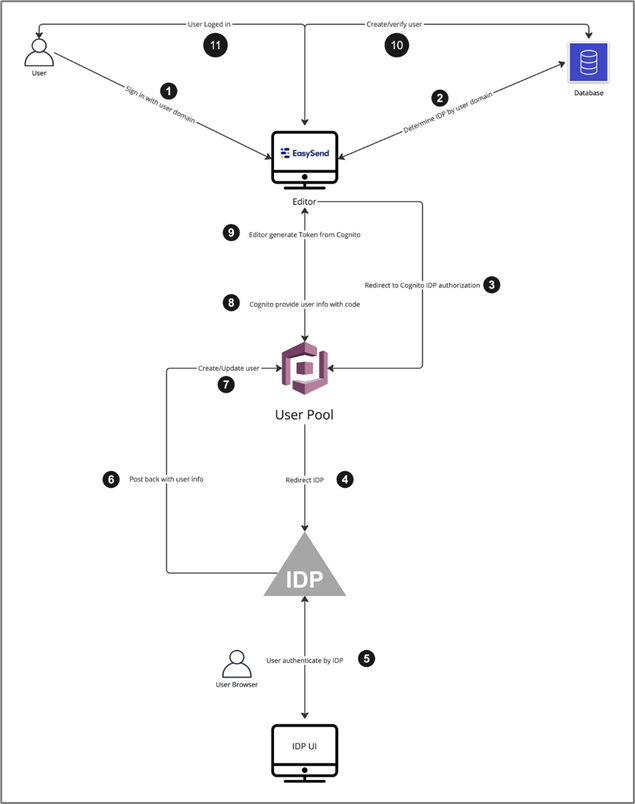
Figure 3: Architecture Diagram - Builder
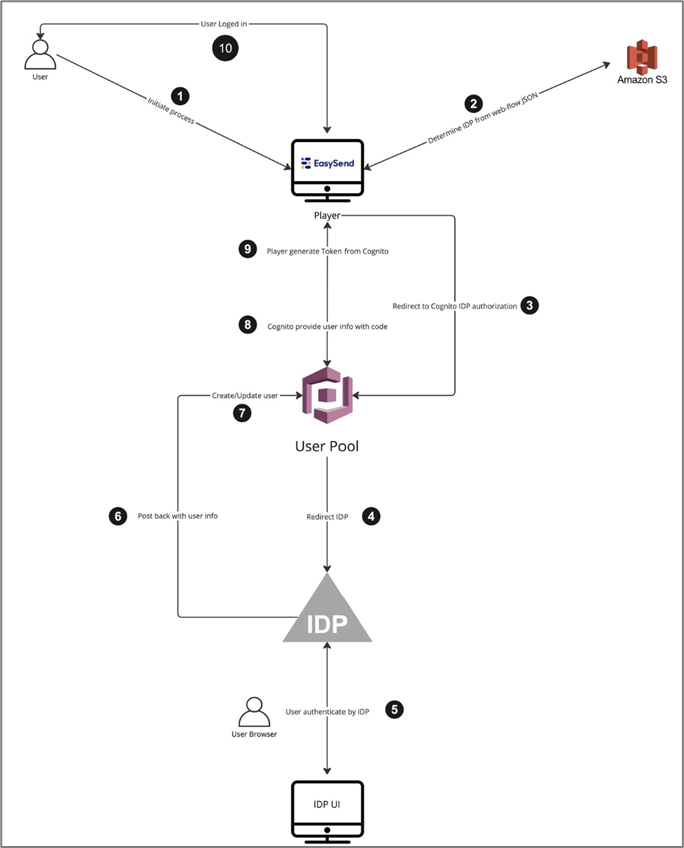
Figure 4: Architecture Diagram - Player