Article Overview
The following article explains what monday.com subitems are, how they work, and when to use them.
Overview
(See Figure 1)
In monday.com, subitems are items that are nested under a parent item on a board. They are used to break down an item into smaller, related components while keeping all information organized within a single board. A parent item typically represents a high-level task, project, deal, or request. Subitems represent the individual steps, deliverables, or line items required to complete or manage that parent item.
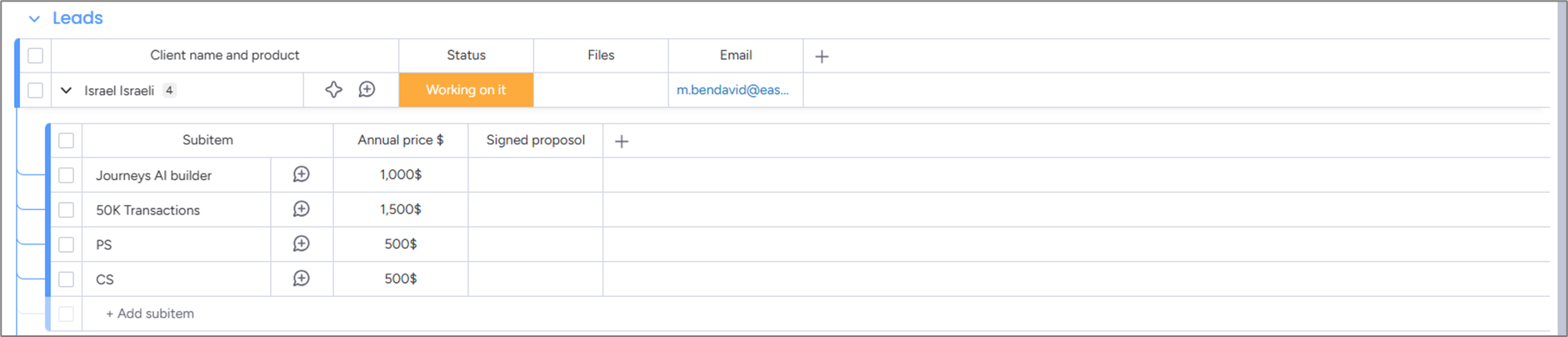
Figure 1: monday.com Subitems Example
How subitems work
- Subitems appear directly beneath their parent item and can be expanded or collapsed using the arrow next to the item name
- Subitems use their own column set, which is configured separately from the parent item’s columns
- All subitems on a board share the same column configuration
- Each subitem can have its own Status, People, Date, Numbers, or other supported column types
- Some parent item columns can display summarized data from subitems, such as overall status or aggregated values
- Subitems can be used in automations and integrations, based on the available features in your account
Common use cases
- Subitems are commonly used to:
- Break down tasks into smaller steps
- Track phases or deliverables within a project
- Manage line items such as invoice details, features, or test cases
- Keep related work grouped under a single item without creating additional boards
When to use subitems
- Use subitems when the work or data:
- Is directly dependent on a single parent item
- Does not need to exist independently across multiple boards
- Can follow a shared column structure