

Introduction
- PDF
Introduction
- PDF
Article summary
Did you find this summary helpful?
Thank you for your feedback!
Overview
Hold Your Own Encryption Key (HYOK) support enables enterprise customers to maintain full ownership and control over the encryption keys used to protect their data. This approach aligns with industry best practices for data privacy and regulatory compliance. Many enterprises handle sensitive information, such as Personally Identifiable Information (PII), and therefore require direct control over how their data is encrypted and decrypted. HYOK gives customers that control, allowing them to manage, and if needed, revoke access to their encryption keys at any time, even while their data is being processed by third-party applications such as our Player platform.
How it works
EasySend's Player platform integrates with a customer-managed encryption service - AWS Key Management Service (KMS). When HYOK is enabled, the following applies:
- Encryption and decryption operations are performed using the customer’s own KMS key.
- Data is never stored unencrypted. Sensitive fields are encrypted before persistence and decrypted only at the moment of access.
- The Player does not persist or manage any customer keys directly; it gets permissions from the AWS API keys, as configured by the customer.
Customer Requirments
- A KMS key must be created and managed in the customer’s AWS account.
- The key must be in the same AWS region as the Player backend - EU Frankfurt.
- The Player's AWS role must be granted permission to use the key (for encryption and decryption).
- No plaintext key material is ever stored or visible to the application after use.
HYOK Flow
(See Figure 1)
The following diagram shows how the Player encrypts and decrypts sensitive data using AWS KMS–generated data keys, while storing only encrypted data + encrypted keys in your EasySend-hosted storage. The Player never stores plaintext keys, ensuring strong security. This flow demonstrates HYOK/customer-controlled encryption:
- The customer controls the KMS key
- This flow demonstrates HYOK/ customer-controlled encryption: can revoke access at any time
- EasySend never sees plaintext encryption keys
- Redis stores only encrypted artifacts
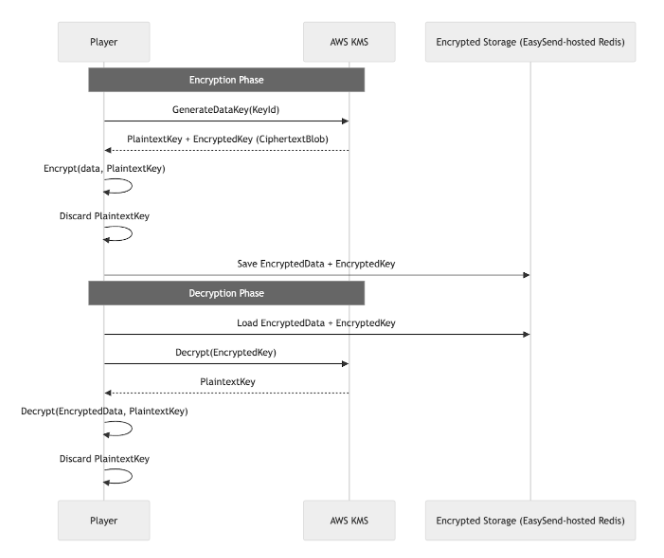
Figure 1: Diagram Flow
Encryption Phase (top half)
1. Player → AWS KMS: Generate Data Key
- The Player requests a data key using a specific KMS Key ID (GenerateDataKey(KeyId))
2. AWS KMS → Player: Returns Two Keys
AWS KMS sends back:
- PlaintextKey - used for immediate encryption
- EncryptedKey (CiphertextBlob) - the same key, encrypted by KMS
The plaintext key is only held in memory temporarily
3. Player: Encrypts the Data
- The Player encrypts the user’s data using the PlaintextKey
4. Player: Discards the Plaintext Key
- Immediately after encrypting, the plaintext key is destroyed
- Only the encrypted key remains.
5. Player → Encrypted Storage (Redis)
The Player saves:
- EncryptedData
- EncryptedKey (the KMS-encrypted version of the data key)
Storage never sees unencrypted data or keys.
Decryption Phase (bottom half)
1. Player Loads the Encrypted Content
From storage, the Player retrieves:
- EncryptedData
- EncryptedKey
2. Player → AWS KMS: Decrypt the Encrypted Key
The Player asks AWS KMS to decrypt the EncryptedKey
3. AWS KMS → Player: Returns PlaintextKey
AWS KMS returns a plaintext version of the data key (again, only in memory).
4. Player Decrypts the Data
- Using that plaintext key
- The Player restores the original plaintext data
5. Player Immediately Discards PlaintextKey
- The key is deleted from memory right after decryption
- No plaintext key is ever stored anywhere persistently
Was this article helpful?