---
title: "Overview"
slug: "easysends-apis"
description: "Learn how to utilize EasySend's API to simplify data sharing between systems and enable pre-filling data on your processes."
updated: 2024-12-17T14:22:53Z
published: 2024-12-17T14:22:53Z
canonical: "kb.easysend.io/easysends-apis"
---
> ## Documentation Index
> Fetch the complete documentation index at: https://kb.easysend.io/llms.txt
> Use this file to discover all available pages before exploring further.
# Overview
## What is EasySign?
The EasySign is an eSignature tool that lets your customers fill out forms without going through a full digital process.
## What Does The Generate Signature Request Link API Used For?
Using the Generate Signature Request Link API You can set an EasySign transaction.
## URL Path
/api/sign/generate-request
## Method
A POST request should be performed with the following HTTP Header: Content-Type: application/json.
## Request Content
**Table 1** describes the required and optional request content parameters.
**Table 1: Request Content**
| **Parameter** | **Type** | **Optional/Required** | **Discerption** |
| --- | --- | --- | --- |
| version | integer | Required | The version of the APINOTEThis documentation specifies API version 2 |
| apiKey | string | Required | Required for environment log-in authenticationNOTEProvided by EasySend, for additional assistance, please get in touch with our support team |
| sendParallel | boolean | Optional | - When set to true - communication with end-users will be done in parallel - When set to false - communication with end-users will be done according to the order in which they were input |
| participants | array | Optional | Describes the participants of the entire signature workflowNOTEFor additional information about participants, click [here](/v1/docs/participants) |
| steps | array | Optional | Describes the steps of the signature workflow: - Which participants participate in each step - Which communication entries are sent: - SMS - Email NOTEFor additional information about [steps](/v1/docs/steps), click here |
| documents | array | Optional | Describes the PDF documents to be filled or signed during the entire workflowNOTEFor additional information about [documents](/v1/docs/documents), click here |
| attachments | array | Optional | A list of attachments requested from signers to upload at the end of the signing processNOTEFor additional information about [attachments](/v1/docs/attachments), click here |
## Authentication Using apiKey Field
The apiKey allows EasySend to use a simple authentication mechanism that is used to authenticate the client against the server. The apiKey must be passed with every API call.
Warning!Your apiKey is private and should always be kept secret. Never share your API key with a 3rd party. Always trigger EasySend APIs from a server-side application. Avoid embedding your API key in a client-side / web-based application.
## Sample Call
```json
{
"version": "2",
"title": "test10_v2",
"apiKey": "1122334455",
"sendParallel": true,
"customerId": "easysend-rnd",
"customData": {
"environment": "dev"
},
"participants": [
{
"id": "singerOne",
"name": "signer one",
"role": "signerOne",
"phone": "0507346662",
"email": "e.maegn@easysend.io"
},
{
"id": "singerTwo",
"name": "signer one",
"role": "singerTwo",
"phone": "0507346662",
"email": "e.maegn@easysend.io"
},
{
"id": "agent",
"name": "agent",
"role": "agent",
"email": "e.magen@easysend.io",
"isAgent": true
}
],
"steps": [
{
"communication": {
"start": [
{
"participantId": "singerOne",
"type": "email",
"email": "e.magen@easysend.io",
"subject": "Documents to sign for test1",
"body": "hi customer: test, here is your link: {{link}}"
},
{
"participantId": "singerTwo",
"type": "email",
"email": "e.magen@easysend.io",
"subject": "Documents to sign for test2",
"body": "hi customer: test, here is your link: {{link}}"
},
{
"participantId": "agent",
"type": "email",
"email": "e.magen@easysend.io",
"subject": "Documents to sign for test",
"body": "hi customer: for the test"
}
],
"finish": [
]
},
"authProvider": {
"type": "standardOTPAuthProvider",
"isTwoFactor": true,
"otpSendMethod": "email",
"skipNotListedParticipants": false,
"skipOtpInDev": false,
"participantsOtp": [
{
"participantId": "singerOne",
"phone": "0544664034",
"email": "r.shoshani@easysend.io"
},
{
"participantId": "singerTwo",
"phone": "0544664034",
"email": "ronshosh@gmail.com"
}
]
}
}
],
"documents": [
{
"id": "9a12f15c-f75b-4a53-b7d1-c2856ef3f036",
"title": "test Document",
"fieldsDetectionType": "whiteOnWhiteDetect",
"file": {
"type": "url",
"url": "https://easysend-static-assets.s3.us-east-1.amazonaws.com/demo-assets/signature-tool/Example%201%20-%20White%20on%20White.pdf"
},
"linkedIds": [
{
"id": "accountHolderName",
"value": {
"type": "text",
"role": "customer",
"required": true
}
},
{
"id": "signature",
"value": {
"type": "signature",
"role": "customer",
"required": true
}
}
]
}
]
}
```
## Success Response
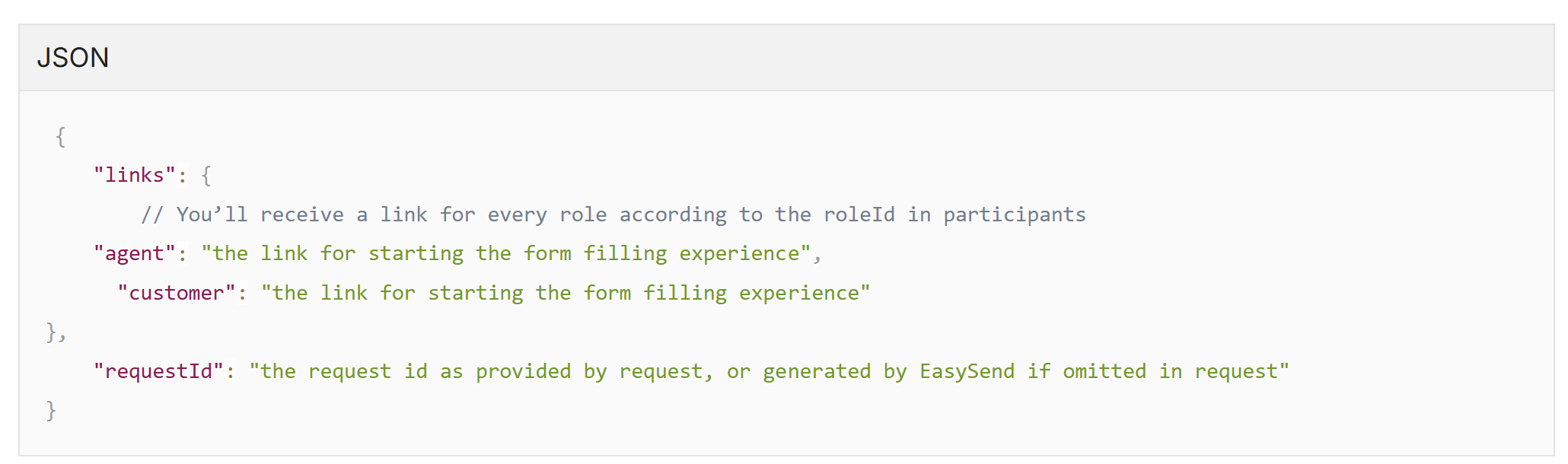
The HTTP status code will determine the success/ failure of the response. Code 200 means success in which case the body of the response is:
## Error Response
- A status code 400 means a failure has occurred. In this case, the body will contain:
```json
{
"errorCode":
"description":
}
```
- A status code 403 means an authentication failure occurred, the body will contain:
```json
Error: An invalid api key was provided
```
## Try it yourself
(See **Figure 1**)
Familiar enough with the structure of the API? Use the [link](https://easysend-player.readme.io/reference/post_signature_generate_form) to generate a signature request link. Provide all necessary parameters, and view the flow and the results.
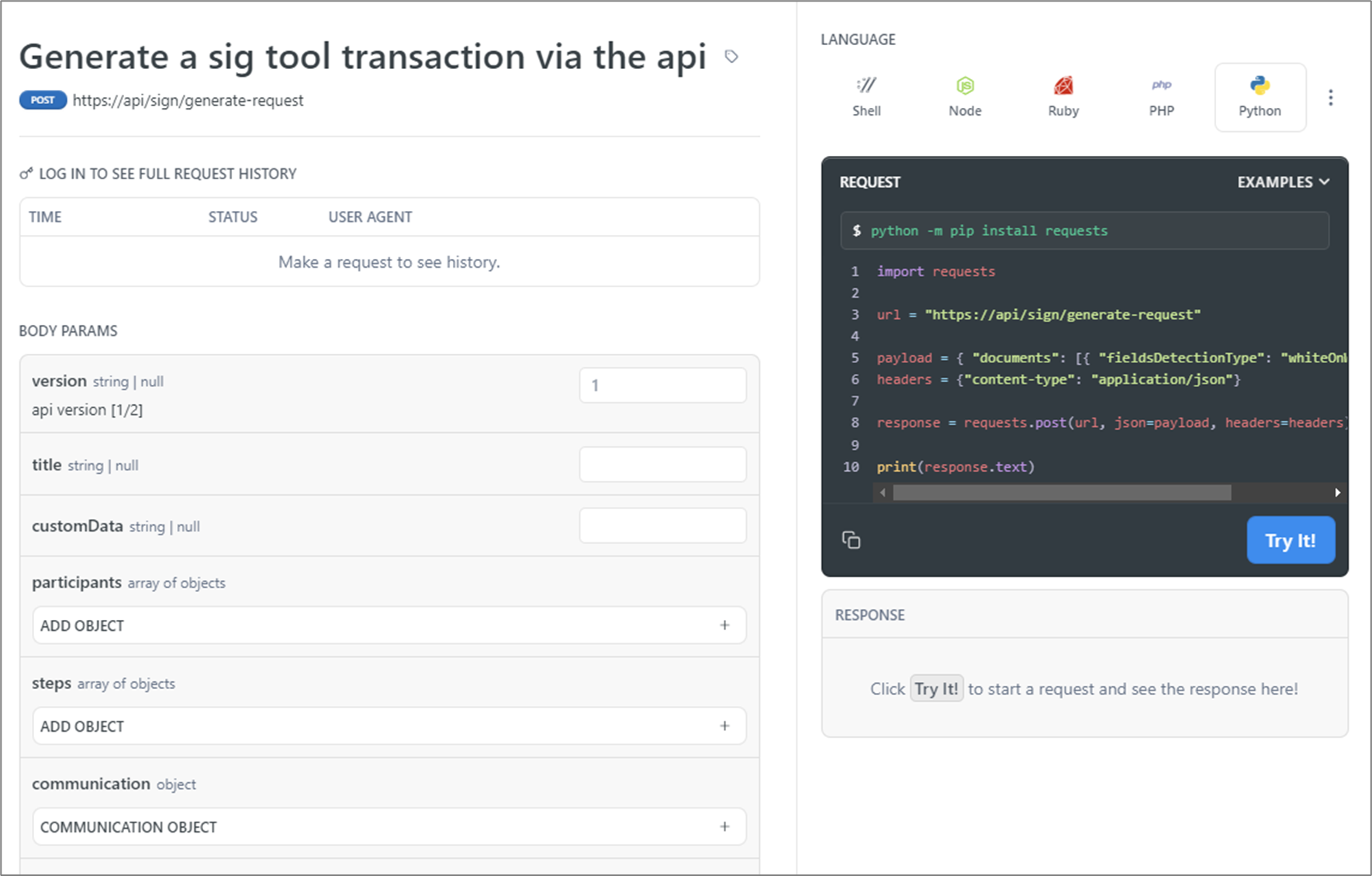
**Figure 1: Readme.io**
NOTEFor additional support testing the API, please contact our support team.